![[Contents]](TOC.GIF)
![[Prev. Chapter]](REW.GIF)

![[Next Section]](NEXT.GIF)
![[Next Chapter]](FF.GIF)
![[Index]](INDEX.GIF)
![[Help]](HELP.GIF)
This chapter describes how to install the TruCluster MEMORY CHANNEL Software on the DIGITAL UNIX Version 4.0D operating system. It also describes how to initialize the MEMORY CHANNEL Application Programming Interface (API) library, and discusses MEMORY CHANNEL configuration.
Note
If you want to install and configure the MEMORY CHANNEL API in a TruCluster Production Server environment, you must use the TruCluster Software Products Software Installation manual.
The chapter discusses the following topics:
Installing the MEMORY CHANNEL software (Section 1.1)
Initializing the MEMORY CHANNEL API library (Section 1.2)
The MEMORY CHANNEL multirail model (Section 1.3)
Tuning your MEMORY CHANNEL configuration (Section 1.4)
Troubleshooting (Section 1.5)
Note
Throughout this manual, a cluster is defined as a MEMORY CHANNEL API cluster, not a Production Server cluster. However, a Production Server cluster may be identical to the MEMORY CHANNEL API cluster.
Members of a MEMORY CHANNEL API cluster must be connected by a MEMORY CHANNEL interconnect, and must have executed the
imc_initcommand. Production Server cluster membership criteria are not the same as MEMORY CHANNEL API cluster membership criteria. Production Server cluster membership is monitored by the connection manager. The connection manager is not associated with MEMORY CHANNEL API cluster membership.
This section and the following subsections describe how to prepare for the MEMORY CHANNEL software installation, the steps involved in the installation, and how to test the completed installation to make sure that it is working correctly.
Note
The procedures described in this section assume that each system's hardware and firmware are installed and configured as described in the TruCluster Software Products Hardware Configuration manual. Do not begin the software installation until the hardware and firmware are installed and configured.
Please note the following general installation restrictions and considerations:
Do not install the product into a dataless environment.
It is recommended that you have at least 64 MB of memory available on each member system.
You must have superuser (root) privileges for the systems on which you will install the software.
Back up all systems before beginning the installation process.
The installation procedure
automatically modifies the /etc/sysconfigtab file;
however, in some cases this manual will tell you to modify, or add to, certain
stanzas in the /etc/sysconfigtab file.
DIGITAL recommends that you use
sysconfigdb(8) to
do this.
![[Prev. Section]](PREV.GIF)
You must assign an Internet Protocol (IP) address and corresponding name to the MEMORY CHANNEL interface on each host.
The network is visible only to the hosts which are directly connected by the MEMORY CHANNEL interconnect; this means that you can use IP addresses of the form 10.0.0.x, since this form of IP address is reserved for private networks. For example, for four hosts, you can assign the following IP addresses:
10.0.0.110.0.0.210.0.0.310.0.0.4
Note
Host number 42 (that is, IP address 10.0.0.42) is reserved by TruCluster software and must not be used. 10.0.0.64 is also a reserved IP address and must not be used.
See the DIGITAL UNIX Network Administration manual for detailed guidelines on allocating IP addresses.
You can assign any unique IP name to the MEMORY CHANNEL interface on each host; for example, you could use the IP name mcclu for a host named clu. Do not use an underscore (_) in an IP name.
The MEMORY CHANNEL software installation
procedure updates the
/etc/hosts
and
/etc/rc.config
file to reflect the IP names and addresses you supply during installation.
The system's host name (the one displayed by the
hostname
program) does not change as a result of installing the MEMORY CHANNEL software.
To halt the system and set the console variables, follow these steps:
Halt the system. For example, to halt the system from multiuser mode with no other users on the system, enter the following command:
# shutdown -h now
If your system supports the
bus_probe_algorithm
console variable, set its value to
new.
This ensures that
peripheral component interconnect (PCI) devices are consistently probed on
all member systems.
To check the setting, enter the following command at the
console prompt:
>>> show bus_probe_algorithm
bus_probe_algorithm new
If necessary, enter the following command to set the
bus_probe_algorithm
variable to
new:
>>> set bus_probe_algorithm new
In order to bring the system to a known state at each reboot,
set the
boot_reset
console variable as follows:
>>> set boot_reset on
If there are MEMORY CHANNEL subsets on the
system, boot
/genvmunix
to single-user mode and deinstall
these subsets by following these steps:
From the console prompt, boot
/genvmunix
to single-user mode; for example:
>>> boot -fl s -fi /genvmunix
Enter the
bcheckrc
command, which makes
the
root
file system writable and mounts local file systems:
# bcheckrc
To make sure that the system's licenses are loaded and active, run the following LMF commands:
# lmf reset# lmf list
Use the
setld -i
command
to determine which MEMORY CHANNEL software subsets are installed.
Use the
setld -d
command to deinstall the
subsets.
To ensure that the subsets are deleted in an order that resolves any
dependencies between subsets, delete all installed subsets with one
setld -d
command.
The following example shows how to delete existing
subsets:
# setld -d TCRCONFnnn TCRMANnnn TCRMCAnnn TCRCOMMONnnn
In the example,
nnn
represents the version number
of the existing subsets that are to be deleted.
The first step in the MEMORY CHANNEL software installation is to install DIGITAL UNIX on each computer in the MEMORY CHANNEL API cluster. It is recommended that you install the same version of DIGITAL UNIX on all of the computers; this will create a more consistent clusterwide environment.
Note
You must install DIGITAL UNIX Version 4.0D or greater in order to run TruCluster MEMORY CHANNEL Software Version 1.5.
Before starting the installation procedures described in the DIGITAL UNIX Installation Guide, read the following list and incorporate these tasks into the installation:
Before installing the operating system, turn on the power to all member systems, the MEMORY CHANNEL hub, and external disks.
Load the following operating system subsets:
OSFBASE |
Base System |
OSFBIN |
Standard Kernel Objects |
OSFBINCOM |
Kernel Header and Common Files |
OSFHWBIN |
Hardware Kernel Modules |
OSFHWBINCOM |
Hardware Kernel Header and Common Files |
OSFCLINET |
Basic Networking Services |
OSFCMPLRS |
Compiler Back End |
OSFNFS |
NFS® Utilities |
OSFDCMT |
Documentation Preparation Tools |
Important Note
If you install new hardware (for example, new MEMORY CHANNEL adapters) after you install or update the DIGITAL UNIX operating system, you must boot
/genvmunixand build a customized kernel. Otherwise, the system's kernel configuration file will not contain these hardware options, and the kernel you build during MEMORY CHANNEL installation will not recognize the new hardware.You must also rebuild the kernel if you change a MEMORY CHANNEL adapter from the PCI slot with which the original kernel was configured.
See the DIGITAL UNIX System Administration manual for more information on configuring kernels.
If you are performing an update installation of the DIGITAL UNIX
Version 4.0D operating system, boot
/genvmunix
after installing
the DIGITAL UNIX Version 4.0D operating system and before loading the MEMORY CHANNEL
Version 1.5 software.
Before you install the MEMORY CHANNEL software, you must register its Product Authorization Key (PAK). The name of the PAK is MCA-UA.
Note
You must register the PAK before installing the MEMORY CHANNEL software; if the PAK is not registered, the installation procedure displays the following message:
There are no TruCluster Software licenses installed.
In order
to install a TruCluster product you must first install the
appropriate LMF PAK (TCR-UA or MCA-UA or ASE-OA).
You can register the PAK using the
lmfsetup
script or the
lmf register
command.
Note
The TCR-UA PAK is associated with TruCluster Production Server software; the ASE-OA PAK is associated with the TruCluster Available Server software. These PAKs should not be present. If you wish to install TruCluster Production Server software or TruCluster Available Server software, use the TruCluster Software Products Software Installation manual.
To load the MEMORY CHANNEL software, follow these steps:
Log in as superuser.
Change the directory to root (cd /).
Mount the device or directory containing the MEMORY CHANNEL kit.
Enter the
setld -l
command and
specify the directory where the kit is located.
For example:
# setld -l /TCR150/kit
The installation procedure automatically starts and lists the available mandatory and optional subsets. You can choose one of the following subset installation options:
All mandatory subsets only
All mandatory and selected optional subsets
All mandatory and all optional subsets
DIGITAL recommends that you choose the "All mandatory and all optional subsets" option.
After you
select an option, the installation procedure checks that there is sufficient
file system space.
After this check completes, the installation procedure
copies the subsets onto your system.
(The following directories are the default
locations for the majority of installed files:
/opt/TCR150/,
/usr/opt/TCR150/, and
/var/opt/TCR150/.
The
/usr/opt/TCR150/sbin/clu_install
script controls most of the installation
process.)
Note
You cannot install individual product subsets. For example, the following command results in an error:
# setld -l /TCR150/kit/TCRCONF150
TCRCONF150 cannot be installed. Please do not install subsets
individually.
The installation procedure prompts you for an Internet Protocol (IP) name and address to associate with the system's network interface. (See Section 1.1.1 for information about required IP names and addresses.)
In the following example, the MEMORY CHANNEL IP name is formed by adding the prefix
mc
with the current host name (clu14) to identify
this IP name as an interface to the MEMORY CHANNEL subnet:
Configuring "TruCluster Configuration Software" (TCRCONF150)
Enter the IP NAME for the cluster interconnect:mcclu14
Note
If you make a mistake when specifying the IP name for the MEMORY CHANNEL adapter, press Return when prompted for the IP address. The installation procedure will prompt you for a new IP name.
The installation procedure
reads the system's
/etc/hosts
file to determine whether
an entry exists for the IP name.
If an entry for the IP name exists, the installation
procedure displays the entry and asks whether you want to replace the existing
entry with the IP name and address you just specified.
For example:
If you want to use the existing
/etc/hosts
entry, answer
n; the information you specified during
installation is ignored.
If you want to replace the existing
/etc/hosts
entry, answer
y.
The installation procedure then replaces
the entry in the
/etc/hosts
file with the IP name and address
you specified.
The installation procedure automatically configures the network interface.
At this point in the installation process, the
kernel configuration and build procedure begins.
You are prompted for the
name of a kernel configuration file.
You can accept the default or enter
the name of another configuration file.
In the following example, the default
configuration file,
CLU14, is accepted:
The kernel will now be configured using "doconfig".
Enter the name of the kernel configuration file. [CLU14]:[Return]
After you specify the name of the kernel configuration
file, the installation procedure asks whether you want to edit the file (after
first saving the original configuration file with a
.bck
extension):
*** KERNEL CONFIGURATION AND BUILD PROCEDURE ***
Saving /sys/conf/CLU14 as /sys/conf/CLU14.bck
Do you want to edit the configuration file? (y/n) [n]:[Return]
To edit the kernel configuration file, answer
y.
Otherwise, accept the default response (n).
If you
answer
y
and the
EDITOR
shell environment
variable is defined,
doconfig
starts that editor; otherwise,
it starts
ed.
The
doconfig
program names the new kernel
/sys/filename/vmunix, where filename is the
name of the configuration file you specified when you configured the MEMORY CHANNEL
API cluster kernel components (see
Section 1.1.8).
If the kernel build is successful, the name of the new kernel file is displayed as follows:
        Working....Tue Nov 25 17:15:32 GMT 1997
        Working....Tue Nov 25 17:17:33 GMT 1997
        Working....Tue Nov 25 17:19:34 GMT 1997

The new kernel is /sys/CLU14/vmunix
When the kernel build is successful, the installation procedure displays a list of instructions; see Example 1-1 for details.
The installation procedure does not automatically move the new kernel to the root directory. You can rename the new kernel or save the existing kernel before manually moving the new kernel to the root directory.
Before moving the original kernel aside and copying the new one to the
root directory, use the
df
command to check that there
is enough disk space for both files.
Move the new kernel to the root directory.
In the
following example, the old kernel is saved as
vmunix.save
and the new kernel,
/sys/CLU14/vmunix, is moved to the
root directory:
# cp /vmunix /vmunix.save # mv /sys/CLU14/vmunix /
After you verify the proper operation of the new kernel, you can remove
the old kernel (called
vmunix.save
in this example).
DIGITAL
recommends that you keep a kernel that does not contain MEMORY CHANNEL API cluster support
(for example,
/genvmunix).
To reboot the system, enter the following command:
# shutdown -r now
During the reboot, startup messages are displayed on the console.
To check the version of the installed software, enter the following command:
# sysconfig -q clubase cluster_version
Example 1-1 outlines a typical MEMORY CHANNEL software installation.
# cd /mnt/TCR150
# ls
TCRCOMMON150  TCRMCA150    TCRCONF150    TCRMAN150     instctrl
# setld -l .

*** Enter subset selections ***

The following subsets are mandatory and will be installed automatically
unless you choose to exit without installing any subsets:

      * TruCluster Common Components
      * TruCluster Configuration Software
      * TruCluster MEMORY CHANNEL(TM) Software

The subsets listed below are optional:

There may be more optional subsets than can be presented on a single
screen. If this is the case, you can choose subsets screen by screen
or all at once on the last screen. All of the choices you make will
be collected for your confirmation before any subsets are installed.

 - TruCluster(TM) Software:
     1) TruCluster Reference Pages

Or you may choose one of the following options:

     2) ALL mandatory and all optional subsets
     3) MANDATORY subsets only
     4) CANCEL selections and redisplay menus
     5) EXIT without installing any subsets

Enter your choices or press RETURN to redisplay menus.
Choices (for example, 1 2 4-6): 2

You are installing the following mandatory subsets:

        TruCluster Common Components
        TruCluster Configuration Software
        TruCluster MEMORY CHANNEL(TM) Software

You are installing the following optional subsets:

 - TruCluster(TM) Software:
        TruCluster Reference Pages

Is this correct? (y/n): y

Checking file system space required to install selected subsets:

File system space checked OK.

4 subset(s) will be installed.

Loading 1 of 4 subset(s)....

TruCluster Common Components
   Copying from . (disk)
   Verifying

Loading 2 of 4 subset(s)....

TruCluster MEMORY CHANNEL(TM) Software
   Copying from . (disk)
   Verifying

Loading 3 of 4 subset(s)....

TruCluster Reference Pages
   Copying from . (disk)
   Verifying

Loading 4 of 4 subset(s)....

TruCluster Configuration Software
   Copying from . (disk)
   Verifying

4 of 4 subset(s) installed successfully.


Configuring "TruCluster Common Components " (TCRCOMMON150)

Configuring "TruCluster MEMORY CHANNEL(TM) Software" (TCRMCA150)

Configuring "TruCluster Reference Pages " (TCRMAN150)

Configuring "TruCluster Configuration Software " (TCRCONF150)

Enter the IP name for the MEMORY CHANNEL adapter:mcclu14

Now you must enter an IP address corresponding to mcclu14.

Enter the IP address for mcclu14 ([Return] to restart): 10.0.0.1

You chose "mcclu14," IP 10.0.0.1 using interface mc0
Is this correct? [y]:  y

The kernel will now be configured using "doconfig".

Enter the name of the kernel configuration file. [CLU14]: CLU14

*** KERNEL CONFIGURATION AND BUILD PROCEDURE ***

Saving /sys/conf/CLU14 as /sys/conf/CLU14.bck

Do you want to edit the configuration file? (y/n) [n]: n


*** PERFORMING KERNEL BUILD ***
        Working....Tue Nov 25 17:15:32 GMT 1997
        Working....Tue Nov 25 17:17:33 GMT 1997
        Working....Tue Nov 25 17:19:34 GMT 1997

The new kernel is /sys/CLU14/vmunix

The kernel build was successful. Please perform the following actions:

        o Move the new kernel to /.
        o Before rebooting make sure that the MEMORY CHANNEL adapter IP
          addresses for all cluster members are recorded in each member's
          /etc/hosts file.
        o Reboot the system.

# mv /sys/CLU14/vmunix /
# reboot
After
the MEMORY CHANNEL software is installed or upgraded, use the cluster installation verification
program,
clu_ivp, to detect configuration errors.
By default, the
clu_ivp
utility displays error
conditions only.
When an error is detected, the
clu_ivp
utility suggests corrective action.
In some cases, the error reported by the
clu_ivp
utility is the symptom of another problem.
Read
all the error messages generated by the
clu_ivp
utility
before attempting to correct problems.
When the corrective action suggested
by the
clu_ivp
utility does not solve the problem, examine
the system's error log files and console output for additional clues.
For more informative output, use the
clu_ivp -v
(verbose)
option.
In addition to reporting error conditions, the utility displays confirmation
of each verification check as it is performed.
To run applications
based on the MEMORY CHANNEL API library, the library must be initialized on each host in the MEMORY CHANNEL
API cluster.
The
imc_init
command initializes the MEMORY CHANNEL API library
and allows applications to use the API.
Initialization of the MEMORY CHANNEL API library occurs
either by automatic execution of the
imc_init
command at
system boot time, or when the system administrator invokes the command from
the command line after the system boots.
Initialization of the MEMORY CHANNEL API library at system boot time is controlled by
the
IMC_AUTO_INIT
variable in the
/etc/rc.config
file.
If the value of this variable is set to 1, the
imc_init
command is invoked at system boot time.
When the MEMORY CHANNEL API library
is initialized at boot time, the values of the
-a
maxalloc
and
-r
maxrecv
flags are set to the values specified by the
IMC_MAX_ALLOC
and
IMC_MAX_RECV
variables in the
/etc/rc.config
file.
The default value for the
maxalloc
parameter and the
maxrecv
parameter is 10 MB.
If the
IMC_AUTO_INIT
variable is set to zero
(0), the MEMORY CHANNEL API library is not initialized at system boot time.
The system administrator must invoke the
imc_init
command
to initialize the library.
The parameter values in the
/etc/rc.config
file are not used when the
imc_init
command
is manually invoked.
The
imc_init
command initializes the MEMORY CHANNEL API library the
first time it is invoked, whether this happens at system boot time or after
the system has booted.
The value of the
-a
maxalloc
flag must be the same on all hosts in the MEMORY CHANNEL API cluster.
If different values are specified, the maximum value specified for any host
determines the clusterwide value that applies to all hosts.
After the MEMORY CHANNEL API library has initialized on the current host, the system administrator
can invoke the
imc_init
command again to reconfigure the
values of the
maxalloc
and
maxrecv
resource limits, without forcing a reboot.
The system administrator
can increase or decrease either limit, but the new limits cannot be lower
than the current usage of the resources.
Reconfiguring the cluster from the
command line does not read or modify the values specified in the
/etc/rc.config
file.
The system administrator can use the
rcmgr(8)
command to modify the parameters and have them take effect when the system
reboots.
You must have root privileges to execute the
imc_init
command.
The MEMORY CHANNEL multirail model supports the concept of physical rails and logical rails. A physical rail is defined as a MEMORY CHANNEL hub with its cables and MEMORY CHANNEL adapters and the MEMORY CHANNEL driver for the adapters on each node. A logical rail is made up of one or two physical rails.
A cluster can have one or more logical rails, up to a maximum of four. Logical rails can be configured in the following styles:
Single-rail
Failover pair
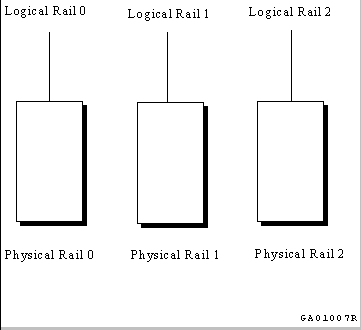
If a cluster is configured in the single-rail style, there is a one-to-one relationship between physical rails and logical rails. This configuration has no failover properties; if the physical rail fails, the logical rail fails.
A benefit of the single-rail configuration is that applications can access the aggregate address space of all logical rails and utilize their aggregate bandwidth for maximum performance.
Figure 1-1 shows a single-rail MEMORY CHANNEL configuration with three logical rails, each of which is also a physical rail.
If a cluster is configured in the failover pair style, a logical rail consists of two physical rails, with one physical rail active and the other inactive. If the active physical rail fails, a failover takes place and the inactive physical rail is used, allowing the logical rail to remain active after the failover. This failover is transparent to the user.
The failover pair style can only exist in a MEMORY CHANNEL configuration consisting of two physical rails.
The failover pair style is the default for all multirail configurations. (It is the failover model used in previous TruCluster software releases.)
The order in which physical rails are paired into logical rails in a failover pair configuration is the order in which they are found at initialization: physical rails zero (0) and 1 are combined to give logical rail zero (0).
The failover pair configuration provides availability in the event of a physical rail failure, as the second physical rail is redundant. However, only the address space and bandwidth of a single physical rail are available at any given time.
Figure 1-2 shows a multirail MEMORY CHANNEL configuration in the failover pair style. The illustrated configuration has one logical rail, made up of two physical rails.

When you implement the MEMORY CHANNEL multirail model, all nodes in a cluster must be configured with an equal number of physical rails, configured into an equal number of logical rails, each with the same failover style.
The first logical rail is numbered zero (0),
the second logical rail is numbered 1, and so on, up to a maximum of four.
This is represented by the constant
IMC_MAXRAILS
in the
imc.h
header file.
The system configuration parameter
rm_rail_style,
in the
/etc/sysconfigtab
file, is used to set multirail
styles.
The
rm_rail_style
parameter can be set to one of
the following values:
Zero (0) for a single-rail style
1 for a failover pair style
The default value of the
rm_rail_style
parameter
is 1.
The
rm_rail_style
parameter must have the same value
for all nodes in a cluster, or configuration errors will occur.
To change the value of the
rm_rail_style
parameter
to zero (0) for a single-rail style, change
the
/etc/sysconfigtab
file by adding or modifying the following
stanza for the
rm
subsystem:
rm:
rm_rail_style=0
Note
DIGITAL recommends that you use sysconfigdb(8) to modify or add to stanzas in the
/etc/sysconfigtabfile.
If you change the
rm_rail_style
parameter, you must
halt the entire cluster, and then reboot each member system.
If the
rm_rail_style
parameter is set to 1 for a
multirail configuration that has an odd number of physical rails, configuration
errors will result.
Note
A cluster will fail if any logical rail fails. See Section 1.5.3 for more information.
Error handling for the MEMORY CHANNEL multirail model is implemented for specified logical rails. See Section 2.2.6 for a description of MEMORY CHANNEL API library error management functions and code examples.
Note
The MEMORY CHANNEL multirail model does not facilitate any type of cluster reconfiguration, such as the addition of hubs or MEMORY CHANNEL adapters. For such reconfiguration, you must first shut down the cluster completely.
The
imc_init
command initializes the MEMORY CHANNEL API library with certain resource defaults.
Depending on your application, you may require more resources than the defaults
allow.
In some cases, you can change certain MEMORY CHANNEL parameters and virtual
memory resource parameters to overcome these limitations.
The following subsections
describe these parameters and explain how to change them.
The amount of total MEMORY CHANNEL address space that is available to the MEMORY CHANNEL
API library is specified using the
maxalloc
parameter
of the
imc_init
command.
The maximum amount of MEMORY CHANNEL address
space that can be attached for receive on a host is specified using the
maxrecv
parameter of the
imc_init
command.
The default limit in each case is 10 MB.
(Section 1.2
describes how to initialize the MEMORY CHANNEL API library using the
imc_init
command.)
You can use the
rcmgr(8) command to change the value used during an automatic initialization
by setting the variables
IMC_MAX_ALLOC
and
IMC_MAX_RECV.
For example, you can set the variables to allow a total of 80
MB of MEMORY CHANNEL address space to be made available to the MEMORY CHANNEL API library clusterwide,
and to allow 60 MB of MEMORY CHANNEL address space to be attached for receive on the
current host, as follows:
rcmgr set IMC_MAX_ALLOC 80rcmgr
set IMC_MAX_RECV 60
If you use the
rcmgr(8) command to set new limits,
they will take effect when the system reboots.
The MEMORY CHANNEL API library initialization command,
imc_init, can
be used to change both the amount of total MEMORY CHANNEL address space available and
the maximum amount of MEMORY CHANNEL address space that can be attached for receive,
after the MEMORY CHANNEL API library has been initialized.
For example, to allow a
total amount of 80 MB of MEMORY CHANNEL address space to be made available clusterwide,
and to allow 60 MB of MEMORY CHANNEL address space to be attached for receive on the
current host, use the following command:
imc_init -a 80 -r 60
If you use the
imc_init
command to set new limits,
they will be lost when the system reboots, and the values of the
IMC_MAX_ALLOC
and
IMC_MAX_RECV
variables will
be used as limits.
Every page of MEMORY CHANNEL address space that is attached for receive must be
backed by a page of physical memory on your system.
This memory is nonpageable;
that is, it is wired memory.
The amount of wired memory on a host cannot be
increased infinitely; the system configuration parameter
vm-syswiredpercent
will impose a limit.
You can change the
vm-syswiredpercent
parameter in the
/etc/sysconfigtab
file.
For example, if you want to set the
vm-syswiredpercent
parameter to 80, the
vm
stanza in the
/etc/sysconfigtab
file must contain the following entry:
vm:
vm-syswiredpercent=80
If you change the
vm-syswiredpercent
parameter, you
must reboot the system.
Note
The default amount of wired memory is sufficient for most operations; DIGITAL recommends that you exercise caution in changing this limit.
When a MEMORY CHANNEL
region is attached or a lock is allocated, a virtual memory map entry is used.
The number of virtual memory map entries is specified by the
vm-mapentries
parameter.
The default value of the
vm-mapentries
parameter is 200 for DIGITAL UNIX Version 4.0D.
If you attempt to attach many
small regions, you may exceed the limit of virtual memory map entries; this
is indicated by the
IMC_MAPENTRIES
error code.
You can change the
vm-mapentries
parameter in the
/etc/sysconfigtab
file.
For example, if you want to set the
vm-mapentries
parameter to 300, the the
vm
stanza
in the
/etc/sysconfigtab
file must contain the following
entry:
vm:
vm-mapentries=300
If you change the
vm-mapentries
parameter, you must
reboot the system.
The following subsections describe error conditions that you may encounter when using the MEMORY CHANNEL API library functions, and suggest solutions.
The
IMC_NOTINIT
status is returned when the
imc_init
command has not been run, or when the
imc_init
command has failed to run correctly.
The
imc_init
command must be run on each host in
the MEMORY CHANNEL API cluster before you can use the MEMORY CHANNEL API library functions.
(Section 1.2
describes how to initialize the MEMORY CHANNEL API library
using the
imc_init
command.)
If the
imc_init
command does not run successfully,
see
Section 1.5.2
for suggested solutions.
The MEMORY CHANNEL API
library may fail to initialize on a host; if this happens, an error message
is displayed on the console, and written to the
messages
log file in the
/usr/var/adm
directory.
Use the following
list of error messages and solutions to eliminate the error:
MEMORY CHANNEL is not initialized for user access
This error message indicates that the current host has not been initialized to use the MEMORY CHANNEL API.
To solve this problem, ensure that all MEMORY CHANNEL cables are correctly attached to the MEMORY CHANNEL adapters on this host. See Section 1.5.3 for more information on fatal errors caused by problems with the physical MEMORY CHANNEL configuration or interconnect.
MEMORY CHANNEL API - rm_no_inheritance must be 1
This error message indicates that the configurable
attribute
rm_no_inheritance
is not set to 1.
The installation
procedure should automatically set the value of
rm_no_inheritance
to 1; however, if this value is changed after installation, the MEMORY CHANNEL
API will fail to initialize.
To solve this problem, the
rm
stanza in the
/etc/sysconfigtab
file must contain the following entry:
rm:
rm_no_inheritance=1
If you change the
rm_no_inheritance
attribute, you
must reboot the system.
MEMORY CHANNEL API - Number of logical rails 1 incompatible
with rest of cluster 2
An error message of this form indicates that the number of logical rails on the booting node (in this example, the booting node has one logical rail) differs from the number of logical rails on the other nodes in the MEMORY CHANNEL API cluster (in this example, the other nodes have two logical rails).
To solve this problem, ensure that all MEMORY CHANNEL cables are correctly attached to the MEMORY CHANNEL adapters on this host. If this is not possible, because of missing or failed hardware, disconnect cables or power down hubs on other hosts so that they mirror this host.
MEMORY CHANNEL API - incompatible MEMORY CHANNEL
Software Version 1.4
This error message indicates that a node in the MEMORY CHANNEL API cluster is running Version 1.4 or Version 1.4a of the TruCluster software.
To solve this problem, upgrade all hosts to run Version 1.5 of the TruCluster
software, and manually invoke the
imc_init
command.
MEMORY CHANNEL API - get_RM_information() failed
with status 212
This error message indicates that logical rail zero (0) is inactive.
To solve this problem, ensure that the hub is powered up and that all cables are connected properly. For more information on how to configure MEMORY CHANNEL hardware, see Chapter 5 of the TruCluster Software Products Hardware Configuration manual.
MEMORY CHANNEL API - insufficient wired memory
This error message indicates that the value
of the
IMC_MAX_RECV
variable in the
/etc/config
file or the value of the
-r
option to the
imc_init
command is greater than the wired memory limit specified
by the configuration parameter
vm-syswiredpercent.
To solve this problem, invoke the
imc_init
command
with a smaller value for the
maxrecv
parameter,
or increase the system wired memory limit as described in
Section 1.4.2.
Sometimes the MEMORY CHANNEL API will fail to initialize because of problems with the physical MEMORY CHANNEL configuration or interconnect. Error messages printed on the console in these circumstances do not mention the MEMORY CHANNEL API. The following subsections describe some of the more common reasons for such failures.
If any logical rail fails, a system panic occurs on one or more hosts in the cluster, and the following error message is displayed on the console:
panic (cpu 0): rm_delete_context: fatal MC error
To solve this problem, ensure that the hub is powered up and that all cables are connected properly; then halt the entire cluster, and reboot each member system.
If the logical rail configuration for a logical rail on this node does not match that of a logical rail on other cluster members, a system panic occurs on one or more hosts in the cluster, and error messages of the following form are displayed on the console:
rm_slave_init
rail configuration does not match cluster expectations for logical rail 0
logical rail 0 has failed initialization
rm_delete_context: lcsr = 0x2a80078, mcerr = 0x20001, mcport = 0x72400001
panic (cpu 0): rm_delete_context: fatal MC error
This error can occur if the configuration parameter
rm_rail_style
is not identical on every node.
To solve this problem, follow these steps:
Halt the system.
Boot
/genvmunix.
Modify the
/etc/sysconfigtab
file as described
in
Section 1.3.3.
Reboot the kernel with MEMORY CHANNEL API cluster support (/vmunix).
If some MEMORY CHANNEL cables are connected incorrectly, a system panic occurs on one or more hosts in the cluster, and error messages of the following form are displayed on the console:
rm_slave_init
slave unit boot phase 0: checking cables
rm_check_cables: cables crossed
logical rail 0 has failed initialization
rm_delete_context: lcsr = 0x2a80078, mcerr = 0x20001, mcport = 0x72400001
panic (cpu 0): rm_delete_context: fatal MC error
To solve this problem, connect the first MEMORY CHANNEL adapter installed in one system to the first adapter installed in the other system, connect the second adapter installed in one system to the second adapter installed in the other system, and so on. In standard hub mode, all MEMORY CHANNEL adapters on a system must be connected to the same slot position in each hub.
For more information on how to configure MEMORY CHANNEL hardware, see Chapter 5 of the TruCluster Software Products Hardware Configuration manual.
The
IMC_MCFULL
status is returned
if there is not enough MEMORY CHANNEL address space to perform an operation.
The amount of total MEMORY CHANNEL address space available to the MEMORY CHANNEL API
library is specified by using the
maxalloc
parameter
of the
imc_init
command, as described in
Section 1.5.2.
You can use the
rcmgr(8) command, or the MEMORY CHANNEL API library
initialization command,
imc_init, to increase the amount
of MEMORY CHANNEL address space that is available to the library clusterwide.
See
Section 1.4.1
for more details.
The
IMC_RXFULL
status is returned by the
imc_asattach()
function, if receive mapping space is exhausted when
an attempt is made to attach a region for receive.
Note
The default amount of receive space on the current host is 10 MB.
The maximum amount of MEMORY CHANNEL address space that can be attached for receive
on a host is specified using the
maxrecv
parameter
of the
imc_init
command, as described in
Section 1.2
.
You can use the
rcmgr(8) command or the MEMORY CHANNEL API library
initialization command,
imc_init, to extend the maximum
amount of MEMORY CHANNEL address space that can be attached for receive on the host.
See
Section 1.4.1
for more details.
The
IMC_WIRED_LIMIT
return value indicates that an attempt has been made to exceed
the maximum quantity of wired memory.
The system configuration parameter
vm-syswiredpercent
specifies the wired memory limit; see
Section 1.4.2
for information
on changing this limit.
The
IMC_MAPENTRIES
return value indicates that the maximum number of virtual memory map entries
has been exceeded for the current process.
The maximum number of virtual memory map entries is specified by the
vm-mapentries
parameter; see
Section 1.4.3
for
information on changing this limit.
The
IMC_NOMEM
return status indicates a
malloc
function failure while
performing a MEMORY CHANNEL API function call.
This will happen if process virtual memory has been exceeded, and can
be remedied by using the usual techniques for extending process virtual memory
limits; that is, by using the
limit
command and the
unlimit
command for the C shell, and by using the
ulimit
command for the Bourne shell and the Korn shell.
The
IMC_NORESOURCES
return
value indicates that there are insufficient MEMORY CHANNEL data structures available
to perform the required operation.
However, the amount of available MEMORY CHANNEL
data structures is fixed, and cannot be increased by changing a parameter.
To solve this problem, amend the application to use fewer regions or locks.