![[Contents]](TOC.GIF)
![[Prev. Chapter]](REW.GIF)

![[Next Section]](NEXT.GIF)
![[Next Chapter]](FF.GIF)
![[Index]](INDEX.GIF)
![[Help]](HELP.GIF)
The TruCluster software products suite consists of three separately licensed products:
TruCluster Available Server Software
TruCluster Production Server Software
TruCluster MEMORY CHANNEL Software
TruCluster MEMORY CHANNEL Software supplies an application programming interface (API) library that lets applications perform high-speed data transfers between systems connected to the MEMORY CHANNEL interconnect. (This API library is also included in the Production Server Software.) TruCluster MEMORY CHANNEL Software, unlike TruCluster Available Server Software and TruCluster Production Server Software provides neither shared storage nor application failover capabilities. Consequently, management of MEMORY CHANNEL Software configurations is largely a matter of setting up the appropriate hardware, installing the software, and understanding the MEMORY CHANNEL API library. These tasks are described in the Hardware Configuration, Software Installation, and MEMORY CHANNEL Application Programming Interfaces manuals. Therefore, the remainder of this manual focuses exclusively on managing Available Server and Production Server configurations.
This chapter provides an overview to understanding available server
environments (ASEs), the additional components of a Production Server cluster,
and how to use the
asemgr
utility.
TruCluster Available Server Software and TruCluster Production Server Software let you configure a highly integrated organization of member systems, services, and storage devices. From a client's perspective, this configuration appears to be a powerful single-server system, providing greater application availability than is possible with a single system, and scalability beyond the limits of a single symmetric multiprocessing system.
A key component of the TruCluster Available Server Software and TruCluster Production Server Software is the storage availability domain. A storage availability domain is a collection of nodes that can access commonly shared storage devices in an available server environment (ASE). These nodes are considered to be ASE members.
Because all members in a given ASE can access the same shared storage, an application that requires that storage can run on any member. Both Production Server Software and Available Server Software let you configure such an application so that it runs on a single ASE member and, upon a failure of that member, restarts on another. This application could be a service that exports Network File System (NFS) file systems to clients, a disk-based application like a database engine or mail service, a tape-based service, or a nondisk-based application, such as a remote login service.
The most significant difference between Production Server Software and Available Server Software is that Production Server Software lets you develop and deploy an application whose components run concurrently, with equal access to raw disk data, on any node in the Production Server configuration. A Production Server cluster provides an ideal environment for applications that require high availability and performance, such as highly parallelized databases and transaction processing systems. The means by which raw disk data is provided to the components of applications distributed throughout the cluster involves a special type of ASE service (provided only with Production Server Software) known as distributed raw disk (DRD). Use of a distributed lock manager (DLM) ensures synchronized access to the data provided clusterwide by DRD services.
Because a Production Server cluster and an Available Server configuration both employ ASE technology, the administrator of either fundamentally manages ASE membership, ASE services, and service storage. However, the distributed nature of services within a Production Server cluster makes the configuration and management of ASEs within the cluster somewhat different than managing the ASE in an Available Server configuration. This manual will make the necessary distinctions as appropriate. To begin, keep the following configuration rules in mind when dealing with a TruCluster configuration:
An Available Server configuration consists of one ASE. A Production Server cluster must contain one ASE; it can include up to four ASEs.
An Available Server configuration's membership is equivalent to the membership of its sole ASE. All members are connected to all common, shared storage and the same primary network.
A Production Server cluster's membership is determined by the member systems' common connection to the MEMORY CHANNEL interconnect.
A Production Server cluster has two to eight members. A cluster member can also be a member of an ASE within the cluster, or the cluster member may not be a member of an ASE.
An ASE contains from two to four members. As a result, a Production Server cluster can include at most four ASEs, each containing two systems.
You establish ASE membership using the
asemgr
utility.
Available Server Software uses a primary network interconnect (Ethernet,
FDDI, or ATM) to maintain ASE membership.
You establish cluster membership by installing the Production Server
Software on each member system and, during installation, by specifying the
addresses of all members' MEMORY CHANNEL interconnects in each member's
/etc/hosts
file.
Within a Production Server cluster both cluster
and ASE membership are maintained over the MEMORY CHANNEL interconnect.
![[Prev. Section]](PREV.GIF)
An available server environment (ASE) is a multinode configuration in which member systems and highly available storage are connected to shared SCSI buses. Software running on each ASE member monitors the health of ASE member systems and shared storage. In case of a failure, the ASE software causes services to fail over to surviving systems in the ASE that share access to the associated storage. Scripts associated with each service control failover.
An Available Server configuration contains a single ASE. A Production Server cluster can contain one or more nonoverlapping ASEs. A given cluster member can be a member of at most one ASE. However, a cluster member does not have to be a member of an ASE.
ASE members run the ASE daemons and driver, which monitor the network interconnects and the status of the systems, disks, and shared SCSI buses in the ASE. The ASE daemons and driver are as follows:
ASE director daemon--Runs on only one member of the ASE and controls the entire ASE.
ASE agent daemon--Runs on each member of the ASE and controls ASE operations on that member.
Host status monitor (HSM) daemon--Runs on each member of the ASE. Like the AM driver, it also monitors that ASE and reports any member system or network failure to the director and agent daemons. The HSM, with the help of the AM driver, detects SCSI bus partitions.
Availability manager (AM) driver--Runs on each member of the ASE as part of its kernel. It monitors that ASE and reports any member system failure to the HSM daemon and device connectivity failures to the agent daemon.
Logger daemon--Tracks all the ASE messages that are generated by the members of the ASE.
The following sections describe the ASE daemons and the AM driver.
The ASE director daemon (asedirector) controls an entire ASE.
It coordinates most of the activities
that occur during ASE setup and operation and has a global view of the ASE.
The ASE director daemon maintains information about ASE members and services,
including which member system is running which service.
It decides what actions
to take when a change in the environment occurs and coordinates these actions
in the ASE.
The ASE director daemon runs on only one member system in the ASE. If an ASE director daemon is not running on one of the members, the agent daemons on the members choose an ASE member to run the daemon.
The ASE director daemon ensures that all the services are always configured on all the member systems, using the ASE agent daemon running on each member to implement its decisions. It also maintains such information as the current state of services and member systems.
For example, I/O events, such as a device going off line or a disk reservation failure, are detected by the availability manager (AM) driver and reported to the director daemon by the agent daemon. Member and network events, such as a member system going down or a network partition, are detected by the HSM daemon and then reported to the director daemon.
In addition, the ASE director daemon handles all requests from the
asemgr
utility, such as configuring a service or displaying status.
An ASE agent daemon (aseagent)
controls ASE operations on each member of an ASE and has a local view of the
ASE.
An ASE agent daemon synchronizes access to shared resources, using the
AM driver interfaces to reserve disks and to receive notification of lost
reservations and device connectivity losses.
Each ASE agent daemon reports local events (such as disk failures) to the ASE director daemon and also performs local ASE management tasks as requested by the director daemon. An ASE agent daemon invokes the commands to configure, start, and stop a service at the request of the director daemon.
An ASE agent daemon runs on each member of an ASE. On each member, the ASE agent daemon initializes the ASE, starts the HSM daemon, and starts the director daemon if necessary. For example, if the ASE director daemon terminates unexpectedly, the ASE agent daemons on the ASE members choose a member on which to run the ASE director daemon, and the ASE agent daemon on that member system starts the ASE director daemon.
A host status monitor
(HSM) daemon (asehsm) runs on each member in an ASE and
monitors member system status.
It detects any breaks (partitions) in the network
connections between member systems.
The HSM daemon uses the availability manager
(AM) driver to query systems over the SCSI bus.
It uses network interfaces
to query systems over the network.
In addition to providing the interface that can query hosts, the AM driver provides the HSM daemon running on a member system with the ability to transfer data when the network is not working.
The HSM daemon is started by the ASE agent daemon and reports to both the ASE director daemon (if it is running locally) and the ASE agent daemon. For example, if a member system goes down, the AM driver notifies the HSM daemon that the SCSI member system query has timed out or that it has noticed a break in the network connection.
The availability manager (AM) driver is a kernel-level device driver that provides device reservations (locking), monitors remote hosts on the SCSI bus, and provides error and event notifications. Changes in the hardware run-time status are detected by the AM driver and reported to the host status monitor (HSM) daemon and the ASE agent daemon running on the member system.
The AM driver interfaces reserve disks and ensure that only one ASE member has access to a shared device at one time. They allow the agent daemon to query devices and the HSM daemon to query members.
If an I/O bus partition occurs (for example, the SCSI bus cable is disconnected from the member system), the AM driver notifies the HSM daemon that the system query failed. If a device is powered off, the AM driver notifies the ASE agent daemon that a device path failure has occurred, or that an I/O bus partition has occurred such that a system no longer has connectivity to a device.
The logger daemon (aselogger)
tracks all the ASE messages that are generated by all the members of an ASE.
When you install the TruCluster software on a system, you are prompted to
determine if you want a logger daemon running on the system.
A logger daemon
can be run on more than one member system in an ASE.
The logger daemon uses the DIGITAL UNIX event logging facility,
syslog, which collects messages that are logged by the various kernel,
command, utility, and application programs.
Messages are logged to a local
file or forwarded to a remote system, as specified in the local system's
/etc/syslog.conf
file.
The logger daemon collects messages generated by the
asemgr
utility, the ASE director daemon, the ASE agent daemon, and the
logger daemon.
Messages generated by the host status manager (HSM) daemon
and the availability manager (AM) driver are logged only to the local system.
If all the logger daemons in the ASE stop, daemon messages continue to be
logged, but only locally.
See the DIGITAL UNIX
System Administration
manual,
syslog(3),
and
syslogd(8)
for information on system event logging.
See
Appendix A
for a description of some ASE error messages.
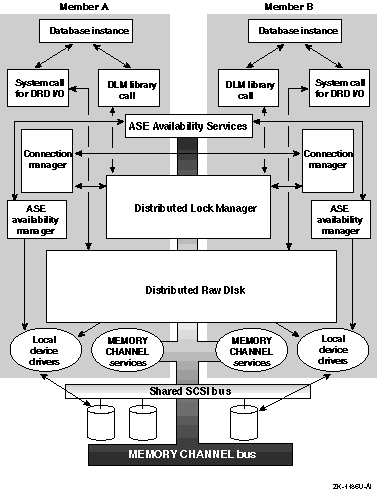
Although the ASE components discussed in Section 1.2 are fundamental to a Production Server cluster's ability to allow database system elements to fail over from member to member without disrupting access to data, there are several other technologies used in the cluster that are critical to the operation of highly available, large database systems:
Distributed raw disk (DRD) services provide transparent remote access to cluster storage from any member system.
Distributed lock manager (DLM) services allow the elements of a distributed database system to synchronize their activities from independent member systems.
The connection manager supports the other subsystems by maintaining cluster membership and managing the addition and removal of members to and from the cluster.
The MEMORY CHANNEL subsystem supports high-speed data sharing among member systems across the MEMORY CHANNEL interconnect.
Figure 1-1 shows the relationship of these components. The remainder of this chapter provides additional details on the operation of these components.
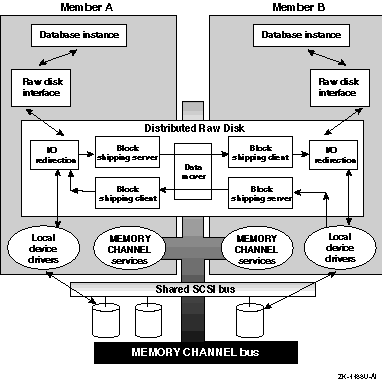
Distributed raw disk (DRD) services allow a disk-based, user-level application to run within a cluster, regardless of where in the cluster the physical storage on which it depends is located. A DRD service allows an application, such as a distributed database system or transaction processing (TP) monitor, parallel access to storage media from multiple cluster members. Applications that perform I/O involving sets of large data files, random access to records within these files, and concurrent read/write data sharing can benefit from using the features of DRD. As deployed within an ASE, a DRD service can survive failures of both the server system and any mirrored disk participating in the service.
The DRD subsystem, shown in Figure 1-2, consists of four primary components:
The raw disk interface (the DRD pseudodevice driver) on client
and server nodes receives user requests through conventional system calls
such as
open,
close,
read,
write, and
ioctl.
For this
reason the driver is considered to be a raw (or character) device driver.
Because it relies on an underlying physical device driver to control the
disk device, the DRD driver is also considered a pseudodevice driver.
When
the DRD driver receives a user request, it first determines whether the node
on which it is running is the server of the physical device that is the object
of the request as follows:
If the node that receives the user request is serving the
physical device that is the object of the request, the DRD driver considers
the request to be a local request.
The driver then passes the local request
to the underlying physical device driver, such as the SCSI CAM driver or
the
Logical Storage Manager (LSM).
If the node that receives the user request is not serving
the physical device that is the object of the request, the DRD driver considers
the request to be a remote request.
The driver passes the remote request
across the network transport to the other node that is the device's server
node.
See
drd(7)
for more information about the DRD pseudodevice driver.
A block shipping client (bsc) that ships
requests for access to remote DRD devices to the appropriate DRD services,
and returns responses to the caller.
See
drd (7)
for more information
on the
bsc.
A block shipping server (bss) that accepts
requests from
bsc
clients, passes them to a local device
driver for service, and returns results to the clients.
See
bssd(8)
for more information on the
bss.
A DRD management facility, not shown in Figure 1-2, that supports DRD device naming, device creation and deletion, device relocation, and device status requests. See Chapter 8 for more information on DRD service administration.
The DRD subsystem, in conjunction with ASE services, is designed to provide applications with uninterrupted access to storage devices. Depending upon the hardware configuration of the cluster, DRD can withstand member failures, controller failures, and disk failures.
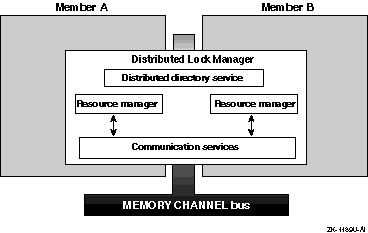
The distributed lock manager (DLM), shown in Figure 1-3, synchronizes access to the resources that are shared among cooperating processes throughout the cluster. For example, a distributed database application uses lock manager services to coordinate access to the shared disks participating in the database.
An application secures a lock on a named shared resource. Resource names can be single-dimensional or tree-structured. A resource tree allows you to create a hierarchy of locks and sublocks that reflect the structure of a shared resource. The DLM:
Provides mutual exclusion, restricted sharing, and full sharing of data access
Allows notification when a lock holder is blocking another process's access to a resource or when a queued lock request completes
Allows conversion between less restrictive and more restrictive lock modes
Provides services that return information about locks
The DLM employs a distributed, centralized tree design. It does not replicate lock information on each cluster member. Rather, the cluster member that manages a lock tree maintains all information about that tree. The member that holds a given lock is aware of only its contribution of that lock to the resource. Any member system can serve as the master for any lock tree, which distributes the overall lock management load.
The DLM uses a distributed directory service to quickly locate the directory node for a resource tree. A directory table associates a root resource name with the cluster member that is the manager of the resource. This directory table is identical on all cluster members.
The DLM is designed to handle member failures. If a lock holder fails, its locks are released. If a member system fails, a new lock master for locks previously mastered on that member is chosen and provided with all pertinent lock information.
The DLM also maintains a communications service that the connection manager uses to establish a communications channel between member systems.
Systems in a Production Server cluster configuration share data and system resources, such as access to data and files. To achieve the coordination required to maintain data integrity, the systems must maintain a clear sense of cluster membership. The connection manager ensures that the clustered systems communicate with one another, and it enforces the rules of cluster membership.
The connection manager is a set of daemons that creates a cluster when the first member is booted, and reconfigures the cluster when other systems join or leave it. The overall responsibilities of the connection manager are to:
Prevent partitioning.
Track which nodes in the cluster are active and which are not.
Add member systems to and remove systems from the cluster.
Establish and maintain a high-performance, highly reliable communications path between each cluster member for use by the DLM. The DLM uses the configuration data and other services provided by the connection manager to maintain a distributed lock database.
Maintain configuration information and make it available to the Cluster Monitor utility and other administrative tools.
Figure 1-4 shows the components of the connection manager.
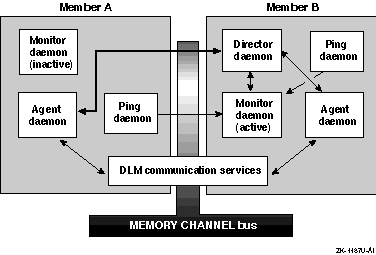
The connection manager consists of a kernel component that maintains the configuration information and, as shown in Figure 1-4, the following daemons that control and distribute configuration information:
Monitor daemon (cnxmond)--The monitor
daemon runs on all cluster members.
It is in a standby state on all but
one member.
On the member on which it is active, the monitor daemon acquires
a MEMORY CHANNEL spinlock, registers an IP alias named
cluster_cnx,
and starts the cluster director daemon (cnxmgrd).
The
acquisition of the spinlock ensures that only one cluster director daemon
is running at any given time in the cluster and prevents multiple registrations
of the
cluster_cnx
service.
When active, the monitor daemon
receives membership requests and periodic keep-alive pings from member systems,
and interacts with the cluster director daemon to maintain and distribute
cluster configuration information.
The monitor daemon also receives event
information (such as cluster interconnect failure) from agent daemons.
The monitor daemon passes information related to membership requests,
pings, and events to the cluster director daemon, which maintains the cluster
membership list and other configuration information.
See
cnxmond(8)
for a description
of the monitor daemon.
Cluster director daemon (cnxmgrd)--The
cluster director daemon runs on a single cluster member and forms a new cluster
by adding systems as they request membership, or it recovers an existing
cluster based on membership information from the latest configuration.
If
the system running the cluster director daemon fails, the monitor daemon
on another system becomes active, acquires the MEMORY CHANNEL spinlock, and starts
the cluster director daemon.
See
cnxmgrd(
8)
for a description of the cluster
director daemon.
Agent daemon (cnxagentd)--The agent
daemon runs on all cluster members and acts as an remote procedure call (RPC)
server to receive configuration data and instructions from the cluster director
daemon.
See
cnxagentd(8)
for a description of the agent daemon.
Ping daemon (cnxpingd)--The ping daemon
runs on all cluster members and acts as an RPC client to periodically interact
with the monitor daemon.
See
cnxpingd(8)
for a description of the ping daemon.
The TruCluster software installation procedure adds or modifies system startup scripts to automatically start these daemons each time the system boots.
In a Production Server configuration, all cluster members must have a direct connection to all other members to facilitate communications among members and provide a fast and reliable transport for passing messages throughout the cluster. This version of the TruCluster software product supports the MEMORY CHANNEL interconnect, a specialized interconnect designed specifically for the needs of clusters.
The MEMORY CHANNEL interconnect is based on a peripheral component interconnect (PCI), which cluster members use to communicate among themselves on a private subnet. (See the TruCluster Software Products Hardware Configuration manual and TruCluster Software Products Software Installation manuals for instructions on how to set up the MEMORY CHANNEL subnet.) Each cluster system has a MEMORY CHANNEL interface card that connects to a MEMORY CHANNEL hub. The MEMORY CHANNEL hub provides both broadcast and point-to-point connections between cluster members. In most two-member cluster configurations, a physical MEMORY CHANNEL hub is not used. Instead, the members utilize the virtual hub mode of the MEMORY CHANNEL interface card.
The Production Server configuration fails over from one MEMORY CHANNEL interconnect to another if a configured and available secondary MEMORY CHANNEL interconnect exists on all member systems, and one of the following situations occurs in the primary interconnect:
More than ten errors are logged within one minute
A link cable is disconnected
The hub is turned off
After the failover completes, the secondary MEMORY CHANNEL interconnect becomes the primary interconnect. Another interconnect failover cannot occur until you fix the problem with the interconnect that was originally the primary.
If more than ten MEMORY CHANNEL errors occur on any member system within a one-minute interval, the MEMORY CHANNEL error recovery code attempts to determine if a secondary MEMORY CHANNEL interconnect has been configured on the member as follows:
If a secondary MEMORY CHANNEL interconnect exists on all member systems, the member system that encountered the error marks the primary MEMORY CHANNEL interconnect as bad and instructs all member systems (including itself) to fail over to their secondary MEMORY CHANNEL interconnect.
If any member system does not have a secondary MEMORY CHANNEL interconnect configured and available, the member system that encountered the error displays a message indicating that it has exceeded the MEMORY CHANNEL hardware error limit and panics.
The MEMORY CHANNEL interconnect:
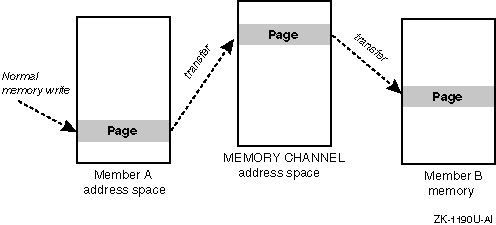
Allows a cluster member to set up a high-performance, memory-mapped connection to other cluster members. These other cluster members can, in turn, map transfers from the MEMORY CHANNEL interconnect directly into their memory. A cluster member can thus obtain a write-only window into the memory of other cluster systems. Normal memory transfers across this connection can be accomplished at extremely low latency (3 to 5 microseconds).
Has built-in error checking, virtually guaranteeing no undetected errors and allowing software error detection mechanisms, such as checksums, to be eliminated. The detected error rate is very low (on the order of one error per year per connection).
Supports high-performance mutual exclusion locking (by means of spinlocks) for synchronized resource control among cooperating applications.
Figure 1-5 shows the general flow of a MEMORY CHANNEL transfer.
You need at least one MEMORY CHANNEL adapter installed in a PCI slot in each member system and a link cable to connect the adapters. If you have more than two members in your cluster, link cables are used to connect the MEMORY CHANNEL adapters to a MEMORY CHANNEL hub.
A redundant MEMORY CHANNEL configuration can further improve reliability and availability. In this case, you need a second MEMORY CHANNEL hub, a second MEMORY CHANNEL adapter in each cluster member, and link cables to connect the second MEMORY CHANNEL adapters to the MEMORY CHANNEL hub.
See the TruCluster Software Products Hardware Configuration manual for information on how to configure the MEMORY CHANNEL interconnect in a cluster.
The
asemgr
utility
allows you to administer the available server environment (ASE) and configure
and manage services.
The
asemgr
utility
has an interactive mode and a command-line interface.
If you enter the
asemgr
command with no options, the utility displays menus and
task items and prompts you for information about the task you want to perform.
You can use the command-line interface for the
asemgr
utility if you want to include the
asemgr
command in shell
scripts.
The syntax for the command is as follows:
/usr/sbin/asemgr
[options]
The options are as follows:
-d [-h
member]|[-v
service]|[-l]
Displays the status of all the member systems
(-h)
and services
(-v)
or specific member systems
and services.
Also displays the member systems that are running the logger
daemon
(-l).
-d [-C [database]]|[-c
service]
Displays the contents of the current or specified ASE database
(-C
[database])
or the contents of the specified service (-c
service).
-m
service
memberRelocates the specified service to the specified member system. When you relocate a service, you stop the service on the member system currently running the service and start the service on another member system.
-r
serviceRestarts a service.
-s
service
[member]Starts the specified service and places it on line, making it available to clients. When the member parameter is specified, the service is started on that member, regardless of the service's current ASP policy.
-x
serviceStops the specified service and places it off line, making it unavailable to clients.
Some ASE administrative tasks
can lock the ASE.
If you try to run the
asemgr
utility
and the ASE is locked, the following message is displayed:
ASE is locked by `hostname`
This message indicates that the task cannot be performed because another
member system is running the
asemgr
utility.